Hello!
We've been busy building new tools to help you run your center more efficiently, from smarter enrollment and attendance tools to a brand-new way for family daycare providers to track their at-home business hours. Here's everything that's new ?
New Feature: Work Time — Track Business Hours at Home
Family daycare providers can now log the hours their home is used for daycare business — the exact record needed for the IRS Form 8829 home office deduction.
• Log time by category (childcare, cleaning, meal prep, admin, etc.), with a start/end time or just a
You'll find it in a new “Work Time” tab under “Expense.”
Custom Staff Roles
Every center runs a little differently — now your staff roles can too. You can create and define custom roles under Staff → Settings → Custom Roles, giving you more flexibility to match permissions to how your team actually works.
Enhanced Enrollment and Store Features
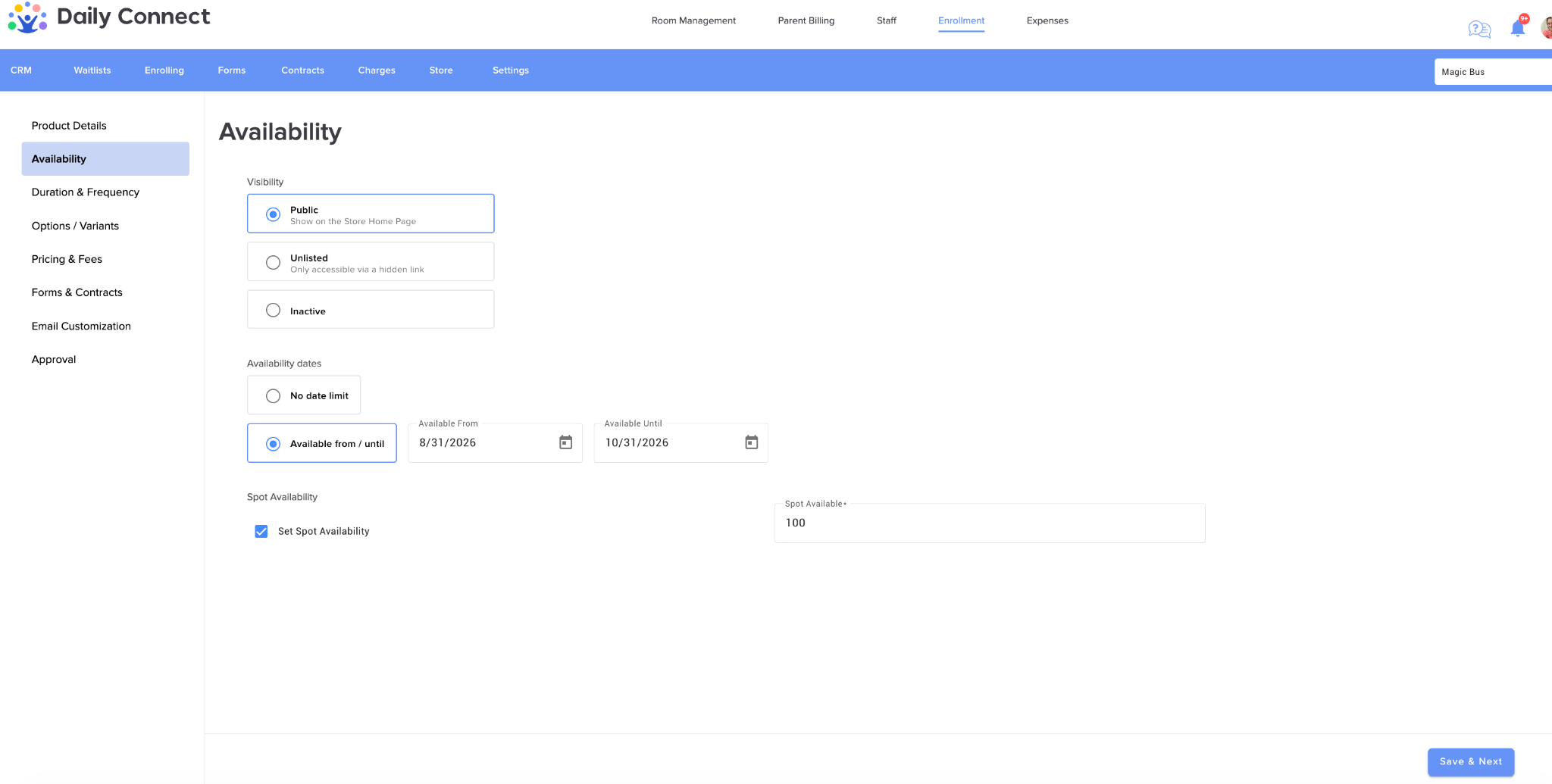
New Availability Page for Store Products: Store Products now have a dedicated Availability page (right after Product Details) that replaces the old Active/Inactive toggle.
Multi-Select for Staff Forms: You can now select multiple staff members at once when sending forms, saving time when you need to reach your whole team.
Store — Active / Not Started Option: A new option lets you set a child's state to Active or Not Started directly from the Store. **When selecting: Anybody can register (account creation required) on the Approval Tab.
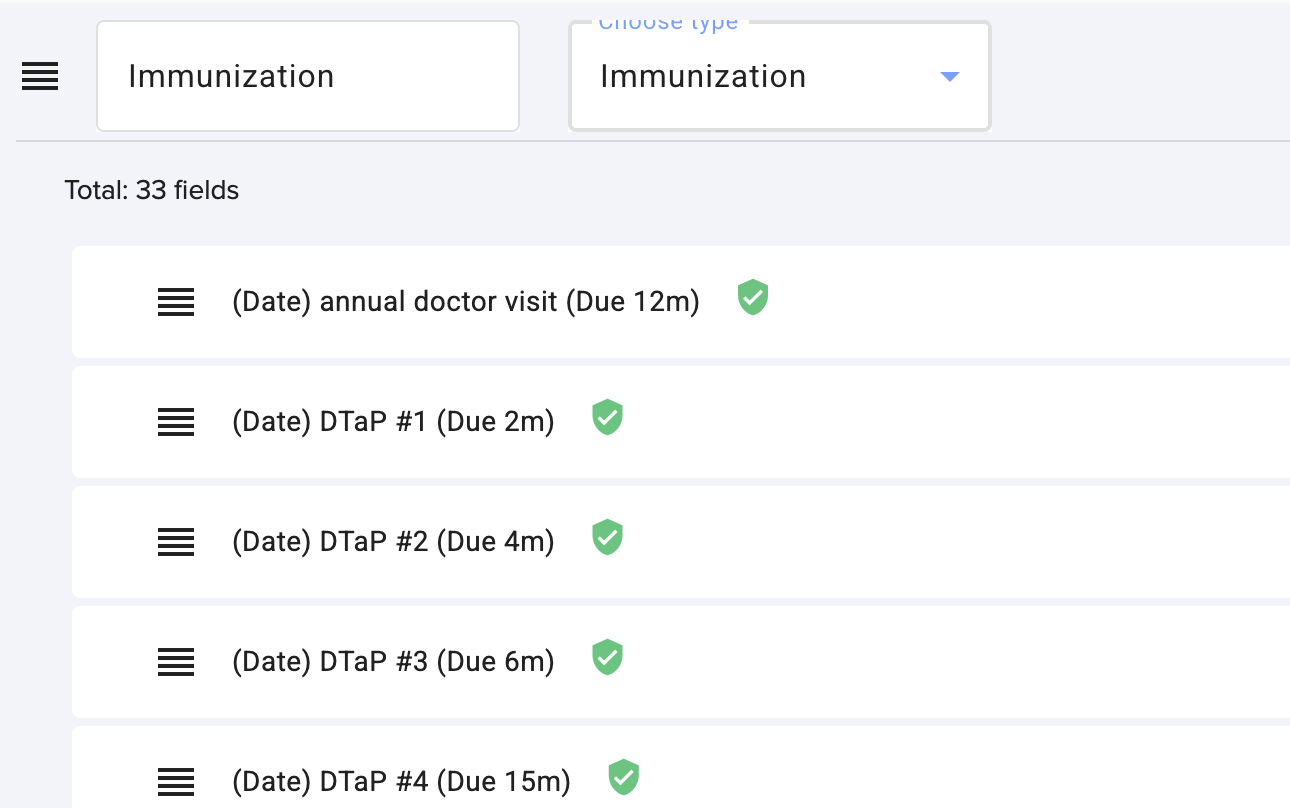
Immunization Dose Numbers on Forms: Form Immunizations now support dose numbers (for example, #3). When you add an Immunization section to a form, all immunizations from your Immunization Requirements settings are automatically added — each with its dose number.
Room Management
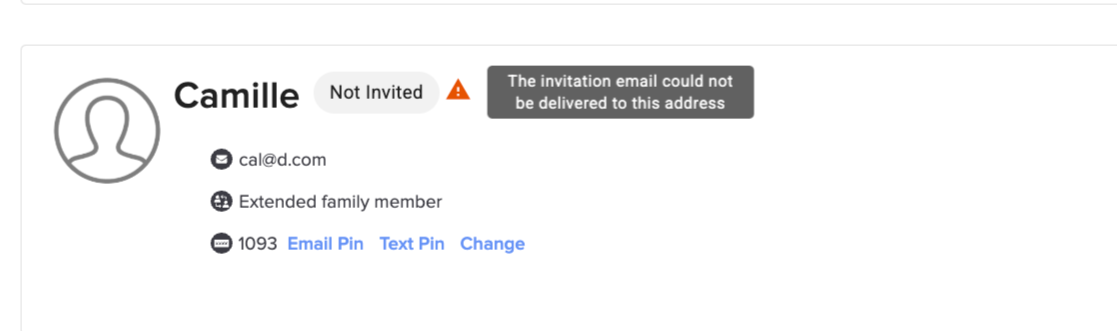
Invitation Delivery Warning: A warning icon now appears if a parent's invitation email hasn't been delivered (for example, if the address is invalid) — in addition to the email notification already sent to the person who sent the invite.
Withdrawal Note:
You can now save a Withdrawal Note when changing a child's status to Graduate, Removed, or Withdrawal. This note can be displayed on the customizable Roster Report.
Attendance
Refreshed Attendance Pages:
We've updated the design of the Attendance pages (Overview and Interactive) for a cleaner, easier-to-use experience.
Quick Add Attendance: A new “Add Attendance” button at the bottom right of a child's attendance page lets you quickly add multiple attendance entries. (Learn more)
Absence Email Notifications:
Administrator notifications for absences submitted by parents are now available as an email notification, in addition to the existing web notification.
Reports
Teacher/Classroom Report:
A Teacher/Classroom account has now access to the reports Tab. Staff will find it via the “Reports” link at the bottom right of the home page.
https://www.loom.com/embed/79d093588a8949bd82a1c61183caac24
New Staff Schedule Page: A new Staff Schedule page makes it easier to track staff times.
Time Card Notes: You can now add a note to any Staff Time Card entry.
New Security Privilege — Expenses: A new security privilege, “Can edit or delete Expenses,” is now available for staff.
New Security Privilege — Subscription Administrators: A new privilege, “Can view information about Subscription Administrators,” is now available under “Has Access to Staff.” It's checked by default for Subscription Administrators and unchecked by default for Childcare Administrators.
Learning & Observations
New Learning Framework: “South Africa NCF (Birth to Four)” is now available as a Learning Framework option.
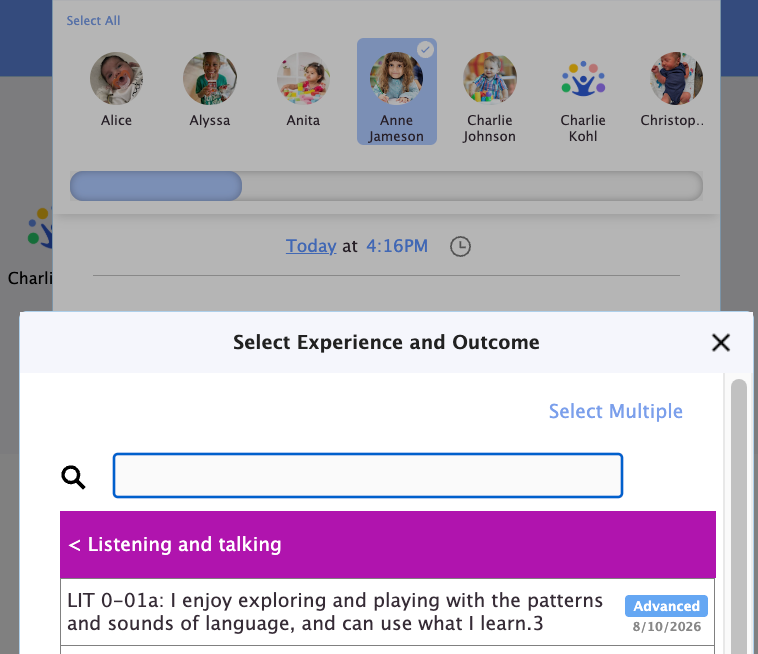
Observations & Skill Picker Update: When only one child is selected, the Skill picker now shows the value and date of that child's latest assessment for each skill.
Other Enhancements
Clickable Parent Names on the Rooms Page: Administrators can now click a parent's name on the Rooms page to open that parent's profile directly.
Merge Authorized Pickups: You can now merge two authorized pickup entries into one. (Learn how to)
Thank you for being part of the Daily Connect community — we're proud to be part of your journey every day.
Need assistance? Our support team is always here to help — simply reach out at support@dailyconnect.com.
We're here for you.
Was this article helpful?
That’s Great!
Thank you for your feedback
Sorry! We couldn't be helpful
Thank you for your feedback
Feedback sent
We appreciate your effort and will try to fix the article