Summer is here, and so are your latest updates ☀️
Hello ,
Summer is in full swing, and we know your center doesn't slow down, so neither do we. This month, we've been focused on giving you more control, better communication tools, and smarter ways to manage your staff, families, and enrollment.
Here's a look at what's new ?
Your CRM, Your Way — Enrollment Just Got Smarter
You asked, we listened. Managing your enrollment pipeline should feel effortless, so we got to work.
Administrators can now customize CRM fields to match exactly how your center tracks families, and choose which columns appear in your CRM view so the information you need is always front and center. No clutter, no workarounds, just a cleaner, faster workflow built around your process.
Watch the video or read our article.
Store & Payments — Scheduled Installments
Store Products can now be scheduled in up to 3 payment installments. Scheduled invoices (2nd and 3rd payments) are not counted toward a parent's account balance, and a courtesy reminder email is automatically sent 2 days before each charge, keeping families informed and reducing payment surprises.
Watch the video or read our article.
Parent Calendar — Schedules, Absences & Store Access
Parents now have a new Calendar version where they can view their child's schedule alongside childcare events. They can log absences (triggering a notification to your center) and, if enabled, jump directly into the Store to enroll in a session.
Watch the video
Share this video with your parents.
New Notification Console
Administrators now have access to a Notification Console on the web app, a central place to receive real-time alerts about Room Management, Staff, Enrollment, and Parent Billing activity.
Child & Room Tags — Organize Your Center Your Way
You can now create custom Child and/or Room Tags under Childcare Settings to label and group children and rooms however makes sense for your center. Tags appear across the Children page, Roster Report, and each child's profile, and can be used when sending emails, texts, messages, or documents. Filter your Roster Report by tag to quickly find exactly who you need.
Watch the video or read our article.
Reports
Individual Assessment Report: The Individual Assessment Report now includes a "Show Last Observation" option, plus skill descriptions displayed below each skill title, giving teachers and administrators richer context for the child's learning development.
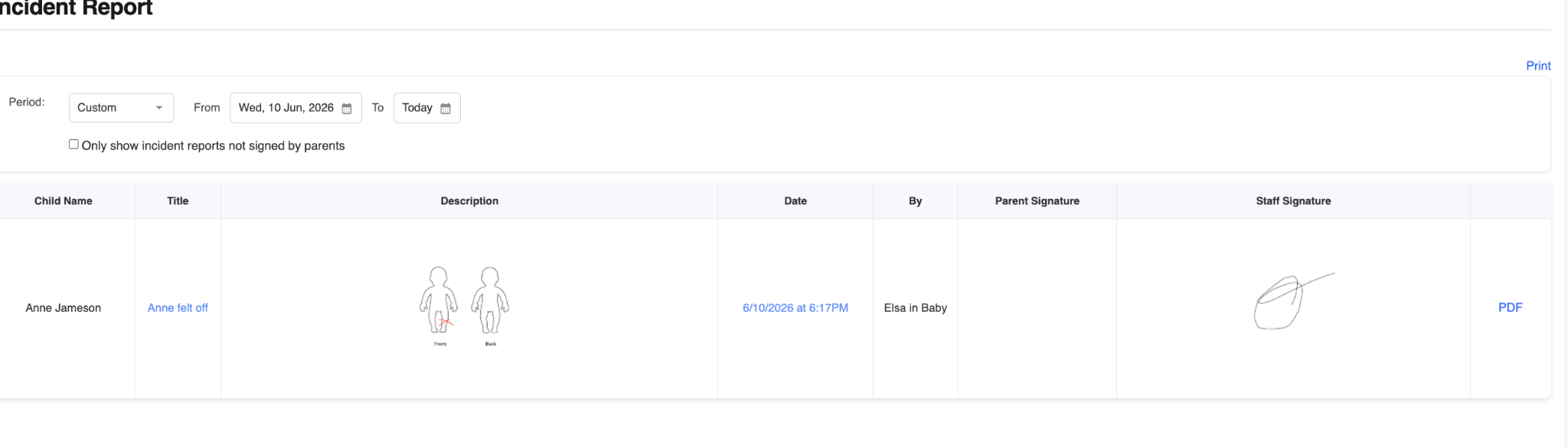
Incident Reports — Expanded Detail & PDF Export: Incident Reports now display staff signatures and custom fields, and each individual entry can be exported as a PDF , making documentation easier for compliance and recordkeeping.
Parent Billing
Security option to prevent staff from ‘ taking payment from parents’ : This option lets you restrict staff members with billing access from taking payments from parents. They can still send invoices. Go to Staff < Open the admin staff profile < Security Check or uncheck the option
Enhanced Enrollment and Store Features
New CRM Form: add a family directly to CRM from a submitted form. (Learn More)
- Multi-Document Question Type: A new Multi-Document question type is now available for child/staff customization and Forms, making it easier to collect multiple files or documents in a single step.

Attendance
Multi-Choice Questions for Sign-In Surveys: Sign-in surveys now support multi-choice questions, not just Yes/No. This new feature gives you more options to capture the information that matters most to your center.

Optional Selfie at Sign-In Kiosk: A new option lets you require parents to take a selfie after entering their PIN or scanning their QR code, before reaching the signature step. A simple way to add an extra layer of identity verification. You can enable this option from the Sign in Kiosk page in Childcare Settings.
Immunization Updates
New View Option: The Immunization page now offers a "By Immunization" view in addition to the existing "By Due Age" option.
Security option for access: Staff access to immunization records can also now be controlled via a new security setting, so only the right team members see sensitive health information. Go to Staff < Open the admin staff profile < Security < Check or uncheck the option
Staff Management Features
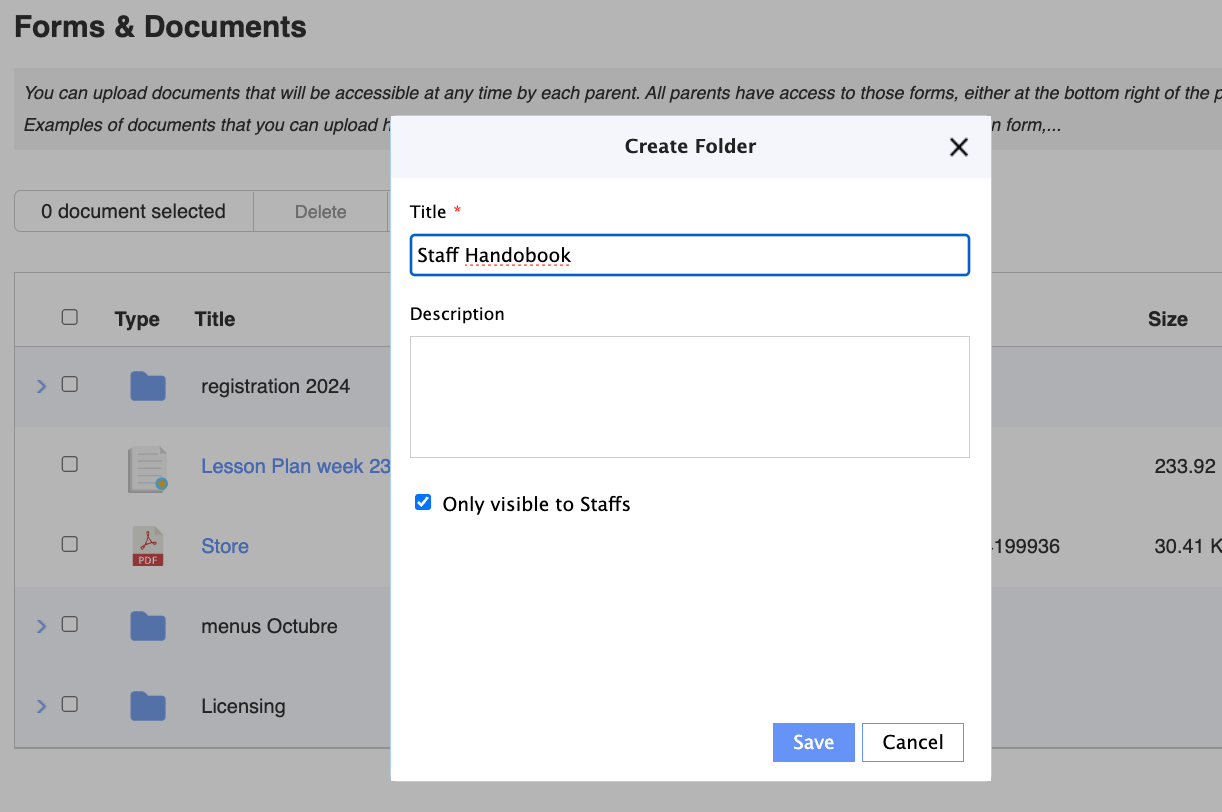
Staff-Only Folders for Forms & Documents: You can now set a Forms & Documents folder as visible to staff only, keeping internal documents out of parent view without removing them from your team's workflow.
New Staff Forms — Onboarding Just Got Easier: Collecting information from new team members used to mean extra steps. Not anymore. You can now create custom forms for staff and register a new staff member directly from a submitted form, turning paperwork into a streamlined, one-step process. (Learn more)
New Notification Console: Administrators now have access to a Notification Console on the web app, a central place to receive real-time alerts about Room Management, Staff, Enrollment, and Parent Billing activity. (Learn more)
Additional Feature Enhancements
Room Management — Clickable Parent Names: In Room Management, the parent's name is now clickable, taking you directly to their details page. Small change, big time-saver.
New Parent Security Option: Administrators can now prevent parents from changing their own name, phone number, or children's information directly from the app. Go to Childcare Settings < Security <Check or uncheck the option
As always, these updates are the direct result of feedback from centers like yours. If you have questions about any of these features, our team is ready to help.
Thank you for being part of the Daily Connect community — we're proud to be part of your journey every day.
Follow us for updates, tips, and more:
instagram, TikTok, Facebook, YouTube, LinkedIn
Need assistance? Our support team is always here to help — simply reach out at support@dailyconnect.com.
We're here for you.
Warm regards,
Jesica Chavez
Head of Customer Success
Was this article helpful?
That’s Great!
Thank you for your feedback
Sorry! We couldn't be helpful
Thank you for your feedback
Feedback sent
We appreciate your effort and will try to fix the article