We’re excited to share the latest enhancements and features designed to make managing your center even smoother, more efficient, and stress-free.
Let’s take a look at what’s new.
Improved Waitlist Management
Managing enrollment demand is now much more flexible.
You can now create multiple waitlists tailored to specific groups, age ranges, or programs — so you always know exactly where each prospective family stands, no matter how many programs you offer.
Smart Lesson Planning is Here!
Say goodbye to hours spent planning lessons from scratch! Daily Connect now includes AI-assisted lesson planning — so teachers can collaborate with AI to build great plans faster and spend more time doing what they love: caring for and educating children.
Available on web via Lesson entries, the calendar, or Childcare Settings → Lesson Plans
Staff Communication
You asked, we listened! You can now communicate with your staff directly through Daily Connect — no more switching between apps or platforms.
Check out this video to learn how to get started.
Automatic Translations for Messages with Families
Your families speak many languages — and now Daily Connect speaks them too.
Any message or entry posted by teachers or staff is automatically translated into each family member’s device language, so every parent, grandparent, and caregiver stays fully in the loop no matter what language they call home. Learn how parents can use it.
Improved Attendance Tracking Tools
- No More Forgotten PIN Codes: Parents can now tap the sign-in/out button on their mobile app to view their PIN code on the spot — no more scrambling at drop-off or pick-up. This option is available when Pin Code sign-in is enabled and manual sign-in is turned off in your security settings.
- Simplified PDF Export: You can now export a child’s attendance record as a simplified PDF — clean, easy to read, and ready to share with parents or licensing agencies in just a few clicks.
- Child Attendance Report Update: The attendance report now displays the name of everyone who signed a child in or out — including childcare staff. Previously, only parents’ names were shown, so this update gives you a more complete and accurate picture of your sign-in records.
- Add Time to Children’s Absences: You can now include a time when recording a child’s absence — making it easy to track tardiness and maintain more precise attendance records directly in Daily Connect.
Better Ways to Manage Parent Communication
- Longer Text Messages: You now have more room to communicate! The maximum length for text messages has been increased from 320 to 450 characters, giving you more flexibility to share important updates with families without having to cut your message short. Read more about our new SMS messaging tools and pricing here. (SMS messaging only available in US and Canada.)
- More Control Over Likes & Comments: You can now manage who sees Likes and Comments directly from your security settings. Parents will only have access based on what you’ve configured — independently of their Message category permissions.
- Keep Immunization Records Up to Date: Chasing down immunization records just got easier. You can now add an Immunization button to parents’ home screens, empowering families to view requirements and upload their own records directly from the app — saving you time and keeping your files current. Enable it under Childcare Settings → Customize Home Page → For Parents. Share this article with your families.
- A More Consistent Experience Across Devices: The web app now mirrors the mobile app experience with the same orange Calendar, Store, and Parent Billing quick-access buttons — so switching between phone and computer feels seamless and familiar.
Add New Team Members to Daily Connect
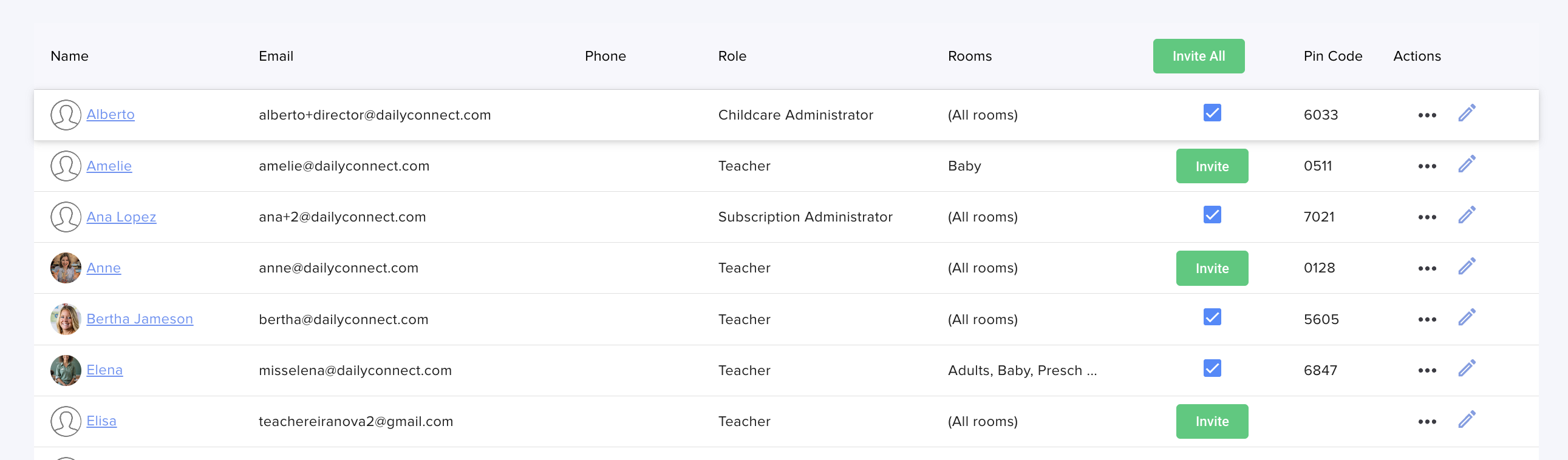
Easier Team Member Invites: You can now invite your entire team or individual employees to join Daily Connect directly from the Staff view — all you need is their email address on file.
Tools to Resolve Slow Image Load Times
Clear Image Cache (iOS): You can now clear the image cache directly on your iPhone or iPad, helping resolve photo-loading issues quickly and easily. Go to Account Settings → Preferences → Clear Image Space.
Comprehensive Parent Billing Improvements
- Billing Program Report: The report is now sorted by child for easier review, and can be downloaded as a CSV — making reconciliation and record-keeping faster and more flexible.
- Invoice CSV Export Update: The Invoice CSV export now includes an Amount Due column, giving you a clearer picture of outstanding balances at a glance.
- Pay All Due Invoices at Once — Now Improved: We’ve improved the Pay All Due Invoices feature. Each invoice is now processed as its own transaction, making payment records easier to track and reconcile. Please note that parents paying with ACH will incur a fee for each invoice processed.
- Daily Billing Programs: Centers that charge daily can now send invoices at the end of each day — making billing more flexible and accurate for programs that don’t follow a traditional weekly or monthly billing cycle. Learn more.
Enhanced CRM & Enrollment Features
- Smarter Payment Scheduling for Store Products: For store products with multiple payment dates, the second payment is now calculated based on each session event date — not just the first. This ensures families are charged at the right time for every session they register for. Please note this applies to new submissions only; existing forms are not affected.
- Save Time with Enrollment Email Templates: No more rewriting the same emails from scratch. You can now create and save email templates in Enrollment → Settings and reuse them across all your enrollment touchpoints — CRM, Waitlist, Form List, and beyond — keeping your communications consistent and professional every time.
- Add Notes to Families in Your CRM & Waitlist: You can now add notes directly to family profiles in your CRM and Waitlist, making it easier to keep track of important details, follow-ups, and conversations as you manage prospective families.
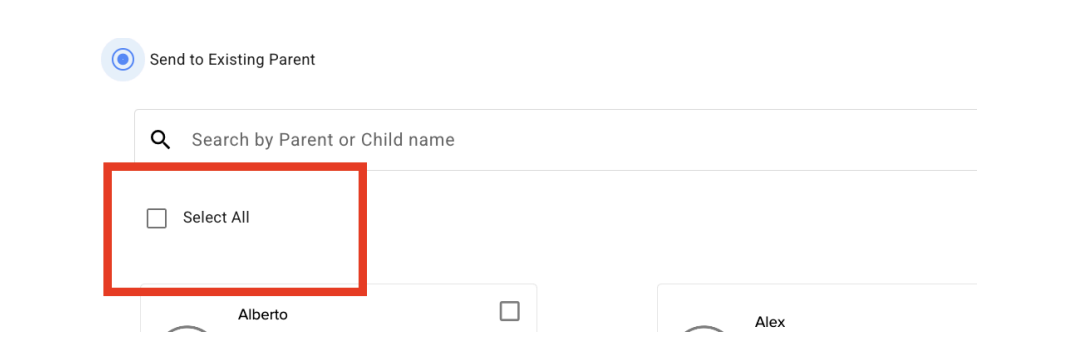
- Send Forms to Existing Parents — Now with “Select All”:
Sending forms to your existing families just got faster. You can now
select all parents with a single checkbox, saving time when you need
to reach everyone quickly.
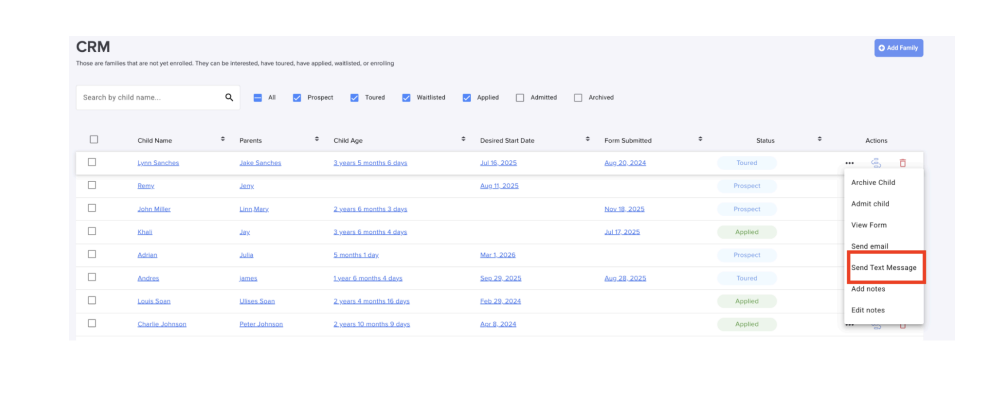
- Send SMS from Your CRM: You can now send text messages directly to prospective families from the Daily Connect CRM — making it easier to follow up, send reminders, and keep prospective families engaged, all in one place.
Thank you for being part of the Daily Connect community — we’re proud to be part of your journey every day.
? Want more tips, feature previews, and childcare inspiration? Join our community.
Need assistance? Our support team is always here to help — simply reach out at support@dailyconnect.com. We're here for you.
Warm regards,
Jesica Chavez Head of Customer Success
Was this article helpful?
That’s Great!
Thank you for your feedback
Sorry! We couldn't be helpful
Thank you for your feedback
Feedback sent
We appreciate your effort and will try to fix the article